Bitbucket Pipelines
Set up Bitbucket Pipelines to upload your build artifacts (IPA or APK) directly to Sauce Labs Mobile App Distribution for distribution.
Setting Up
-
Open your Bitbucket repository, and select Settings > Pipelines > Environment Variables
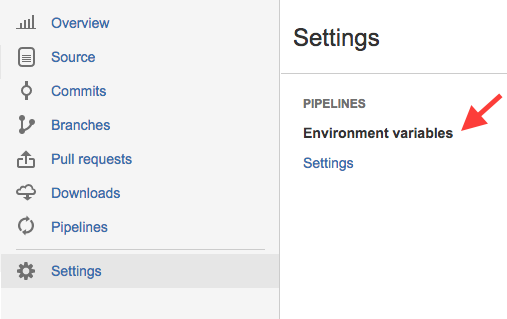
-
Fill in variable and value:
- Variable: TESTFAIRY_API_KEY
- Value: Your API key. Find it under API Credentials in the top navigation bar, or in the API Key section of My Profile. See API Keys for details.
- Secured: Y
-
Click Add.
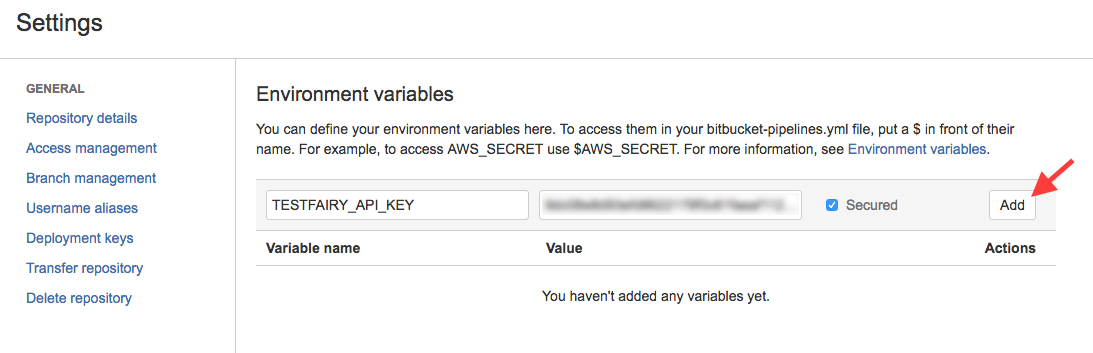
-
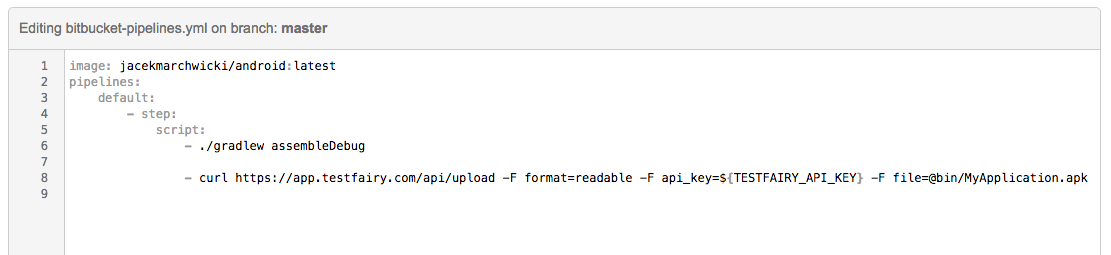
Edit your
bitbucket-pipelines.ymland add this command to yourscriptsection:curl https://app.testfairy.com/api/upload -F api_key=${TESTFAIRY_API_KEY} -F file=@MyApplicationFile.apk
caution
Do not forget to replace MyApplicationFile.apk with the path to your APK or IPA files.
Additional optional parameters such as groups, notify, and comment can be added to this line. Refer to the Upload API reference guide for more information and examples.
Here is a screenshot of a sample bitbucket-pipelines.yml file: