Sauce Labs IDE Plugins
The Sauce Labs IDE plugin brings Real Device Cloud and AI Test Authoring directly into your editor. Browse and control real devices, install apps, stream logs, run Appium tests, and generate test code from natural language, all without switching to a browser.
Supported IDEs
The plugin is available today for VS Code:
 VS Code
Support for Cursor, Antigravity, IntelliJ IDEA, and Android Studio (and other VS Code- and JetBrains-based IDEs) is coming soon:
 Cursor (coming soon)
 Antigravity (coming soon)
 IntelliJ IDEA (coming soon)
 Android Studio (coming soon)
All IDEs share the same feature set. Everything documented in this section applies to every supported IDE unless a page notes otherwise.
Why use the IDE plugin?
Working with Sauce Labs traditionally means leaving the IDE: testing on a real device requires opening a browser, navigating the web UI, allocating a device, and returning to your code, and tests authored with AI live in a separate cloud UI instead of your repository. The IDE plugin removes both round trips, for testing and for authoring:
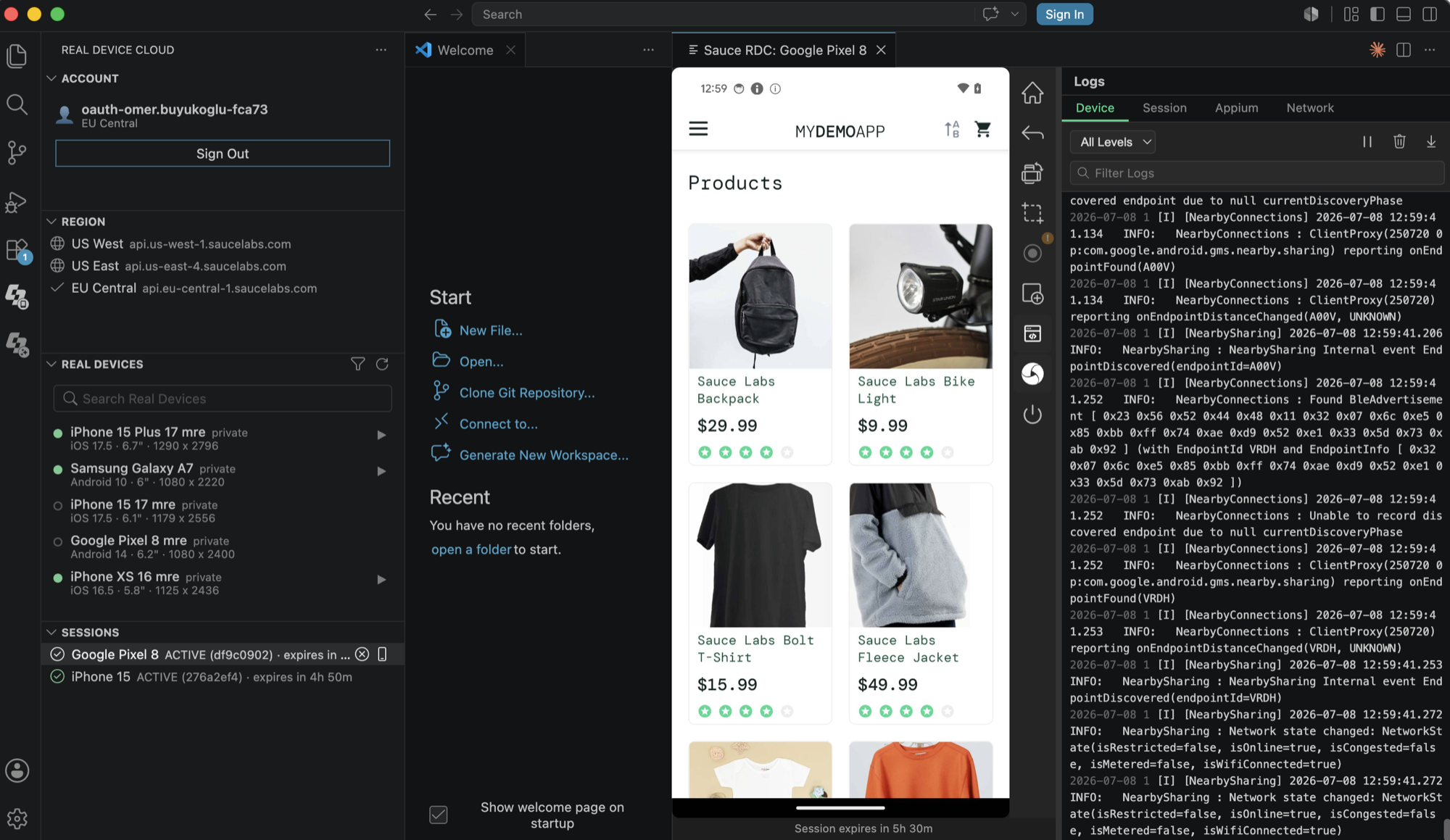
- Live device screen in the editor. The device screen streams in real time into an IDE panel. Tap, swipe, rotate, and press hardware buttons without leaving your editor or opening a browser tab.
- Full diagnostic context in one place. Device logs, Appium server logs, and network traffic stream into the IDE alongside your code, color-coded by severity.
- Appium automation with zero manual configuration. The plugin starts a Sauce-hosted Appium server and injects the connection URL into your terminals and debug sessions automatically. Code annotations offer a one-click rewrite of your driver initialization code.
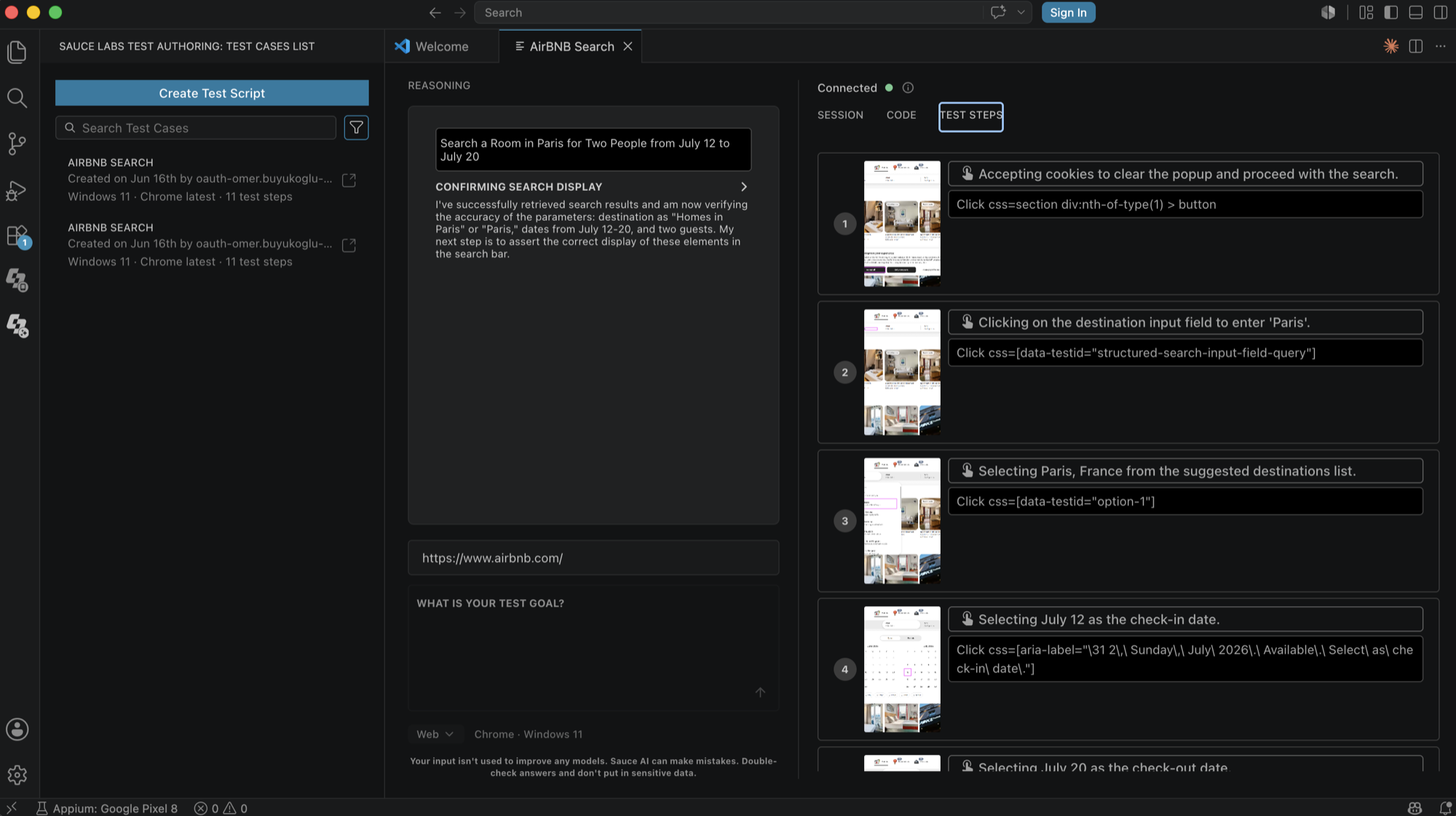
- Tests written in plain English, executed on real infrastructure. Describe what you want to test and the AI runs it live on a Sauce Labs browser or device session while you watch each step land, with a screenshot, the action taken, and the locator behind it. No test code needed to get started.
- Test authoring in your own repository. Get the generated test back as runnable code in your framework and language, and insert it into the open file or save it straight to your workspace, so it flows into your repository and CI/CD pipeline instead of living in a separate cloud UI. Saved test cases stay in sync with the Test Authoring web UI, so the whole team works from the same library.
What you can do
Real Device Cloud
| Capability | Description |
|---|---|
| Device discovery | Browse real devices across all Sauce Labs data centers, filter by platform or private-device access, and search by model name |
| Live sessions | Start a session with one click and interact with the live device screen (tap, swipe, hardware buttons, rotate) |
| App installation | Upload and install .apk and .ipa builds on the active device; iOS apps are instrumented automatically |
| Log streaming | Stream device logs, Appium logs, and network traffic in real time, color-coded across five severity levels |
| Appium integration | Start a Sauce-hosted Appium server and run your local Appium tests against the live session with automatic SAUCE_APPIUM_URL injection |
| Screenshots and recording | Capture PNG screenshots and record sessions as MP4 video |
AI Test Authoring
| Capability | Description |
|---|---|
| Natural language test generation | Describe a test in plain English, or Gherkin/Cucumber style, and the AI builds it for you; no code required to start |
| Web and mobile targets | Run against desktop browsers or real and virtual mobile devices, using app builds from Sauce Labs app storage |
| Live step-by-step execution | Watch each step run on a live session, with a screenshot, the action taken, its locator, and the assertions verified |
| Code generation | Export the test as runnable code in your framework and language, and insert it into your editor, save it to your workspace, or copy it |
| Test case management | Saved tests sync with your Sauce Labs account; open, re-run, rename, edit, or delete them from the IDE |
| Session pairing | An active Real Device Cloud session is detected automatically and pre-fills the mobile target for test authoring. Note: This creates a separate device session. |
Requirements and entitlements
The plugin itself is free to install and comes at no additional cost. Sign in with your existing Sauce Labs credentials; no separate plugin licensing or API setup is required. Access to specific features depends on your account:
- Live device sessions are powered by the Real Device Access API and require private (dedicated) devices and Real Device Access API concurrency on your account.
- AI Test Authoring requires Sauce AI for Test Authoring, a paid add-on for Enterprise accounts.
- Beyond these entitlements, access can also depend on your role and permissions within your Sauce Labs organization. If a feature is missing or returns a permissions error, ask your organization administrator to review your team membership and access settings.