Sauce Connect Proxy 5 Quickstart Guide
Sauce Connect Proxy is essential for securely testing applications or websites that are hosted behind a firewall or on a local network. This guide walks you through the fastest way to get up and running with a basic Sauce Connect 5 tunnel, so you can start testing in just a few minutes.
Prerequisites
- A Sauce Labs account (Log in or sign up for a free trial license).
- If you haven't already, make sure you can access the website or mobile app that you'll be testing from the Sauce Connect Proxy host.
- Sauce Connect Proxy 5 client installed on your machine. See the installation instructions
Getting Started
Run Sauce Connect Proxy
- Make sure that the directory containing the
scbinary (orsauce-connect.exe, for Windows) is in the$PATH. Otherwise, you will have to specify the path to the binary in the command line(e.g.,/path/to/sc). - Define environment variables containing sensitive data: your username and access key
SAUCE_USERNAME=<username>
SAUCE_ACCESS_KEY=<your access key>
- Start Sauce Connect Proxy
- Mac/Linux
- Windows
sc run --tunnel-name $SAUCE_TUNNEL_NAME --region <us-west|us-east|eu-central>
sauce-connect.exe run --tunnel-name $SAUCE_TUNNEL_NAME --region <us-west|us-east|eu-central>
Verify Connection
To confirm your tunnel is up, look for the confirmation message in your terminal:
Sauce Connect is up, you may start your tests
Alternatively, you can check your list of active tunnels on the Tunnel Proxies page: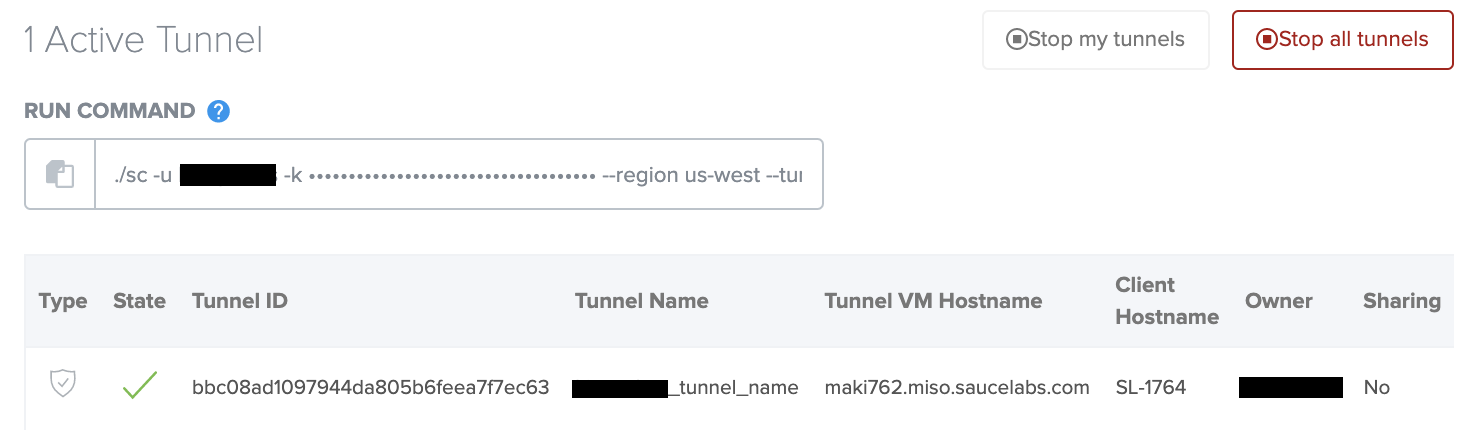
Run Test
With your tunnel up and running, try doing a Live local test.
- Cross-Browser
- Mobile Browser
- Mobile App
- From Sauce Labs, click Live > Cross Browser > Desktop.
- In the URL field, enter your website's local URL (e.g.,
http://localhost:3000). - From the Sauce Connect Proxy dropdown, select your tunnel name.
- Select your desired browser configuration.
- Click Start Test to launch your live test in Sauce Labs.
- From your terminal or IDE, launch a local instance of your site as you normally would.
- From Sauce Labs, click Live > Cross Browser > Mobile Virtual or Mobile Real.
- Enter the local URL for your local website under test (e.g.,
http://localhost:3000) - From the Sauce Connect Proxy dropdown, select your tunnel name.
- Select your desired Mobile Virtual or Mobile Real device configuration.
- Click Start Test to launch your live test in Sauce Labs.
- From Sauce Labs, click Live > Mobile App.
- Click Upload App to upload your iOS or Android mobile app file to Sauce Labs.
- Find your app in the apps list, hover your mouse over it, and click Choose Device.
- To test your app on a real device, click Mobile Real. To test it on an emulator or simulator, click Mobile Virtual.
- Select your desired device configuration, including your tunnel name in the Sauce Connect Proxy dropdown.
- Click Start Test to launch your live test in Sauce Labs.
Stop Tunnel
When you've finished testing, you can stop your tunnel from the terminal where Sauce Connect is running by entering Ctrl+C. If there are jobs that use the Sauce Connect Proxy connection, it will wait for them to finish.
2024/01/23 15:19:33.152509 [control] [INFO] Sauce Connect is up, you may start your tests
^C
2024/01/23 15:29:12.617959 [control] [INFO] waiting for 1 active job(s) to finish, timeout: 3h0m0s
2024/01/23 15:29:27.622295 [control] [INFO] waiting for 1 active job(s) to finish, timeout: 2h59m45s
2024/01/23 15:29:42.600553 [control] [INFO] waiting for 1 active job(s) to finish, timeout: 2h59m30s
2024/01/23 15:30:00.924115 [control] [INFO] tunnel was shutdown gracefully
Alternatively, you can go to the Tunnel Proxies page and click one of the Stop Tunnels buttons.
Best Practices
- Security: Store credentials securely via config file or environment variables.
- Monitoring: See monitoring guide.
- Readiness Check: See readiness check guide.